
I still believe WordPress is one of the best tools for managing website content. What has changed is that AI coding agents now make it more practical for founders, marketers, and creators to keep WordPress as the CMS while building a custom front end for the brand experience.
This works best when the AI agent can read the local project, including the backend context, front end code, brand rules, content strategy, and existing components. I still define the strategy, review the work, and maintain the system.
I reached this view after more than 10 years of building WordPress websites for my own projects and clients. For years, I relied on premium themes and page builders, including on the previous version of my own site.
For the current rebuild, I kept WordPress for content but moved the brand experience into a custom front end. That gave me more control over the design and gave the AI agent a real project in which to help implement my decisions.
I no longer see this setup as a choice between WordPress and code, or between a WordPress theme and custom development.
The useful question is simpler. What should each part of the website do?
WordPress can manage content, publishing, and SEO metadata. A custom front end can handle the brand system, layout, motion, conversion paths, and user experience.
AI agents have made this setup practical for more people, but a vague prompt is not enough. What makes the approach practical is the combination of clear website strategy, strong local context, and human review.
The problem was never WordPress
Over those years, I worked with premium themes, page builders, child themes, custom CSS, and client-specific setups. I still think WordPress is one of the strongest content management systems available.
Premium themes are not bad. Elementor, Divi, and similar page builders can create very good websites. For many businesses, they are the right choice because they make publishing and editing easier.
The limits appear when a website needs more than a good standard design. A serious B2B brand may need more control over layout, performance, and the path visitors take through the site.
The design should feel like the brand, not like a theme with different colors.
That is when the theme layer can start to feel heavy. Strong results are still possible, but they often require custom CSS, PHP changes, child themes, and several plugin dependencies.
You also need to manage updates and may still need support from a developer or agency.
What premium themes taught me after 10+ years
The promise of a premium theme is speed. You install it, import a demo, change the copy, adjust the visuals, and launch something polished.
That works until you want the site to feel truly yours.
In my experience, the work becomes more complex as soon as you push beyond the default structure. You add custom CSS to adjust spacing, typography, responsive behavior, or component styling.
You may need a child theme so updates do not overwrite your work. You also depend on updates from the theme, page builder, and plugins continuing to work together.
For someone who is not a programmer, that can be frustrating. I know some CSS and PHP, but I do not want the quality of the website to depend on how well I can work around a theme’s limits.
Before AI coding agents, getting more control usually meant hiring a developer or agency to build a custom theme or front end. That gave you more freedom, but it also increased cost and dependency.
Now there is a more accessible middle path.
AI agents make an established workflow more accessible
My preferred workflow now is to keep WordPress as the CMS and build the front end separately.
WordPress manages pages, posts, media, metadata, and publishing. The front end retrieves that content through an API and controls how the website looks and works.
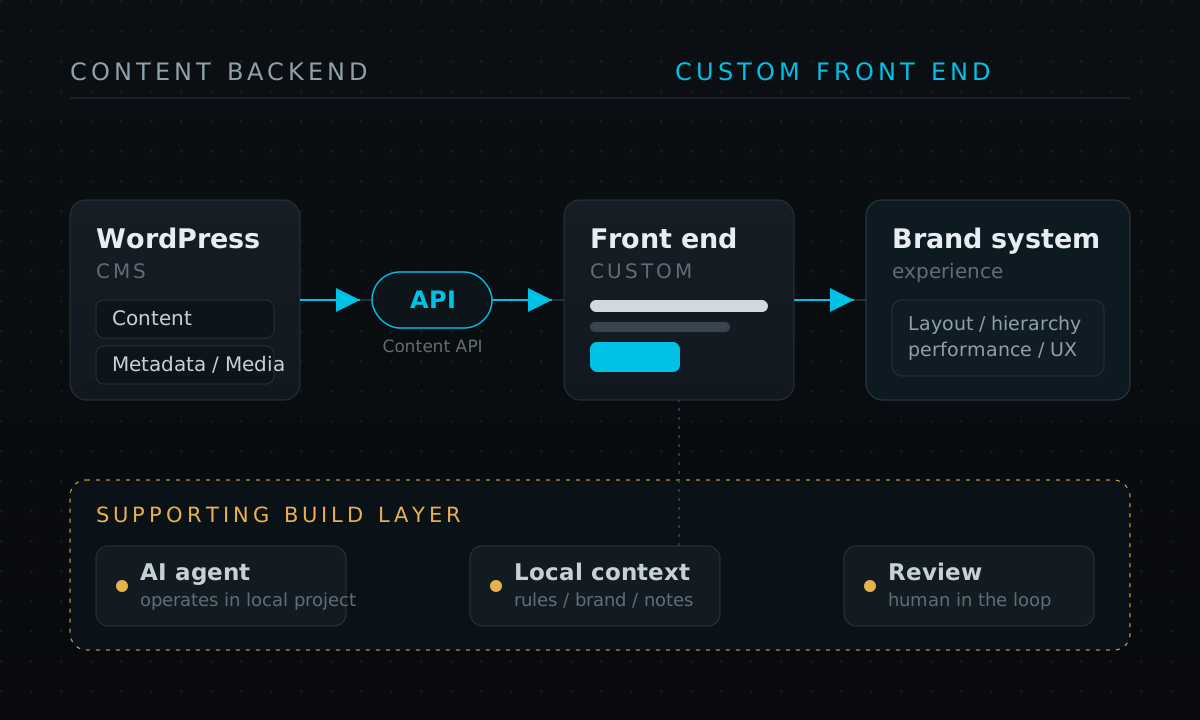
The tools for this setup already exist. The WordPress REST API lets another application read WordPress content as JSON. WPGraphQL provides a GraphQL option.
A custom front end can use Next.js to retrieve and display the content. Vercel offers a Next.js WordPress headless CMS template and a guide to using headless WordPress with Next.js. Faust.js is another toolkit for building this setup.
So the architecture is not the new part. The new part is who can realistically work with it.
Before, this kind of setup usually meant hiring developers. Now, Codex in the ChatGPT desktop app and Claude Code can work inside a local project.
They can read the codebase, edit files, run commands, and follow project rules. This makes the approach more accessible to founders, marketers, and creators who can define the strategy and review the work.
I explain that division of work in how I use Codex as my builder and Claude as my design specialist.
AI agents do not replace the strategy
This is where I think the distinction matters.
The workflow is not “ask AI to design a website.” That produces generic work. It may look impressive at first, but without project context it often drifts from the brand, structure, and earlier decisions.
The difference is context.
The real workflow is not asking AI to design a website. It is giving an AI agent a local website system with enough context to make good decisions.
For my own site, I keep the WordPress backend, front end code, brand rules, content strategy, design direction, and AI agent instructions in the same local project.
The AI agent can inspect what already exists and follow the design system. It can also see how content comes from WordPress, so its changes fit the real structure of the site.
That is very different from asking a chatbot for a homepage.
The minimum context pack I would give an AI agent
If I were starting a serious AI-assisted website project, I would not begin with the homepage. I would begin with the context pack.
At minimum, I would want these files or equivalents inside the local project.
- Project rules that explain what the website is, who it is for, and what the AI agent must and must not do.
- Brand direction with the visual style, colors, typography, tone, examples, and things to avoid.
- Content strategy with the audience, voice, SEO direction, content pillars, rules for calls to action, and publishing expectations.
- Backend notes that explain how WordPress is used, which API is used, what content types exist, and where SEO metadata comes from.
- Front end notes with the framework, component rules, CSS rules, design tokens, file-placement rules, and build commands.
- Page brief with the purpose of the page, required sections, conversion goal, copy notes, and internal links.
- Existing examples such as previous pages, shared styles, components, and templates the AI agent should reuse instead of inventing a new system each time.
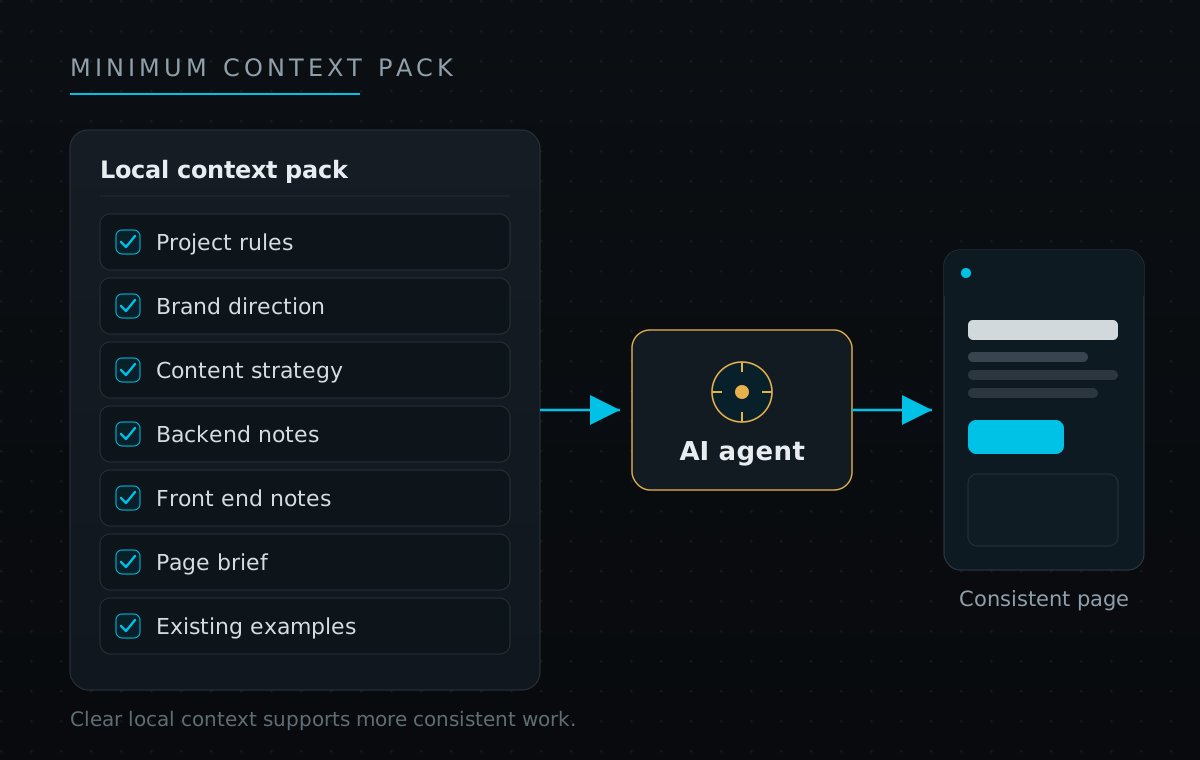
Weak context often leads to generic output, while strong context makes consistency more likely. The AI agent can see the design rules, backend, front end, and earlier decisions.
It can then work more like a build partner and less like a random generator.
I use the same principle with Codex skills that save repetition without replacing review.
My current workflow
Here is the workflow I am using now.
- Define the strategy locally. I write the brand direction, content strategy, and page intent into project files so the AI agent can read them.
- Keep WordPress as the CMS. WordPress manages the content and gives me the publishing experience I already know.
- Keep the front end in code. The front end owns layout, components, responsive behavior, visual polish, and conversion paths.
- Let the AI agent work in the local project. Codex or Claude Code can inspect the actual files, follow the rules, and make changes in context.
- Review the result yourself. I still judge whether the page explains the offer, feels premium, works properly, and guides the visitor to the next step.
- Iterate faster. Instead of adjusting every layer manually in a page builder, I can ask the AI agent to refine the front end while following the same project rules.
That last part matters. AI does not remove the need for judgment. It removes some of the manual friction between the judgment and the implementation.
When this approach makes sense
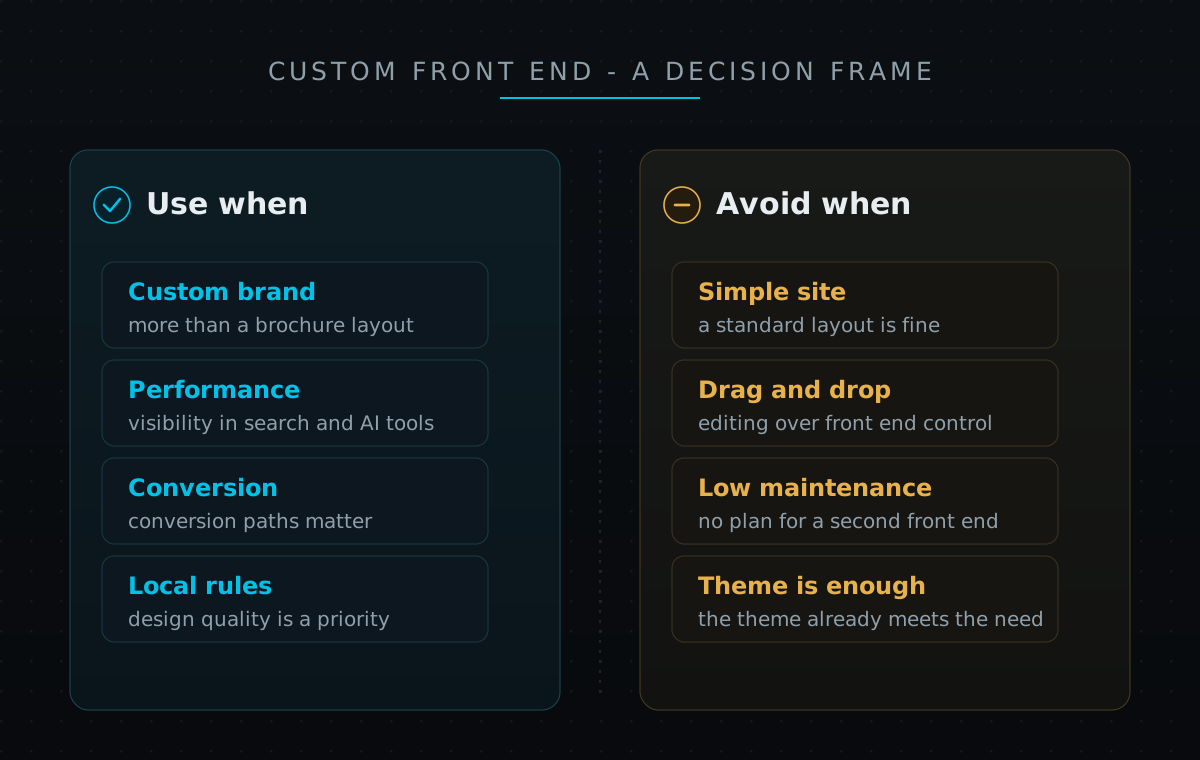
I would consider this approach when the website needs more than a standard brochure layout.
This approach makes sense when a company wants WordPress for content but needs a custom brand experience. It is especially useful when the website needs to attract and convert visitors, not just publish company information.
In that case, conversion, performance, design quality, and visibility in search and AI tools all matter.
This can also suit a lean team. A founder, marketing lead, or creator can keep more control because the front end is not locked inside a theme.
The AI agent can help with the implementation inside a structured local project.
The tradeoff is more responsibility. You need to maintain a separate front end, use version control, and keep clear project rules. You also need to understand enough of the system to review the AI agent’s work.
When I would not use it
I would not recommend this for every WordPress site.
For a simple site, a good theme or page builder may be the fastest and most sensible option. A traditional WordPress build may also be better when the team values drag-and-drop editing more than front end control.
If no one wants to maintain a separate front end, a headless setup can create more complexity than value.
The point is not to make every website headless. It is to stop expecting the WordPress theme layer to control every part of a custom brand experience.
Decide what each layer should own
Do not start by asking whether WordPress is modern or outdated. That is the wrong question.
Ask which layer should own which job.
For me, the answer is becoming clearer. WordPress should manage the content, while the front end manages the brand system. AI coding agents make that split more accessible when they can work with the full local project.
This does not remove the need for strategy, maintenance, or human review. It makes the workflow more practical for founders, marketers, and creators who can define what the website needs and judge whether the result is right.